
LatencyMon
A Windows diagnostic tool for finding out why your real-time audio is clicking, popping or dropping out, and which innocent-looking driver deserves your suspicion.
Audio & Midi Utilities - Performance
Product information
Overview
LatencyMon is the program you launch after hearing one click too many. It checks whether a Windows system can reliably handle real-time audio and helps investigate the dropouts, pops and glitches that can turn an otherwise perfectly good recording session into a troubleshooting session. Rather than measuring conventional audio latency alone, it watches how Windows, drivers and processes respond to time-critical work. Because sometimes your audio interface is innocent and the real villain is hiding considerably deeper in the system.
Find the Culprit
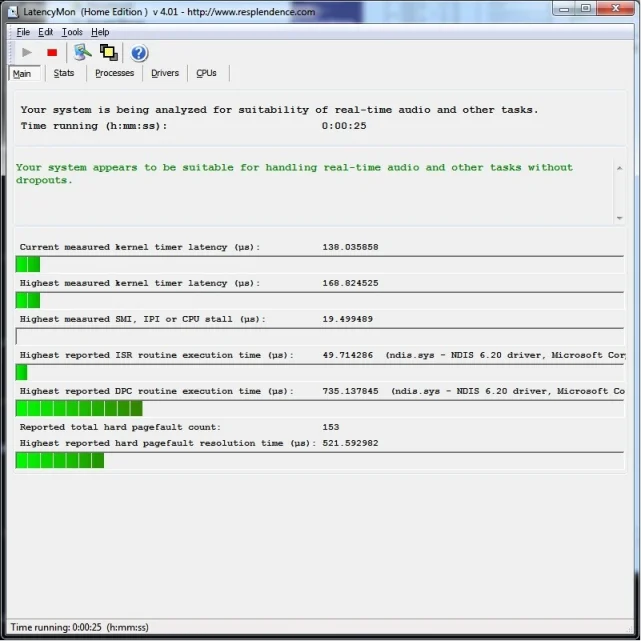
LatencyMon monitors things such as DPC execution, interrupt service routines and hard pagefaults while the system is running. More importantly, it helps connect those measurements to the drivers and processes responsible for them. That turns a vague problem like my audio keeps crackling into something you can actually investigate. Maybe it is a network driver, maybe a device driver, maybe Windows has simply chosen today for violence. At least now you have names.
Green Is a Beautiful Color
Run LatencyMon while the machine is working and it gradually builds a picture of how suitable the system is for real-time audio. For musicians chasing stable low buffer sizes, seeing it report that the system appears suitable can be considerably more satisfying than a diagnostic window has any right to be. Seeing red warnings is less satisfying, but still useful. LatencyMon does not magically fix the machine for you. It gives you evidence, which is much better than randomly disabling Windows services until either the crackling stops or Wi-Fi disappears.
Before Blaming the Interface
LatencyMon is especially useful when preparing a Windows machine for recording, live performance or other workloads where missing a deadline means audible trouble. It can expose system-level problems that ordinary CPU usage meters simply do not explain. That makes it a valuable sanity check before replacing perfectly good audio hardware. When a session starts clicking and popping, the expensive interface on your desk is an easy suspect. LatencyMon politely suggests interrogating the drivers first.
Technical specifications
- Software type
- Standalone
Minimum
- Notes
- Windows 7 or later (32-bit and 64-bit).